Showing posts with label JasperSoft. Show all posts

Sunday, February 3, 2013

Mondrian: Consequences of not defining an All member

To come straight to the point: If you do not define an all member for a hierarchy Mondrian will implicitly create a slicer with the default member of the dimension … this is even happening if you do not mention the dimension at all in your MDX query!

In example take following MDX:
SELECT
[Measures].[Sales] ON 0,
[Sales Channels].[Sales Channel].Children ON 1
FROM
[Sales]

If we take a look at the SQL that Mondrian generates, we suddenly see that it tries to restrict on the year 2012 in the join condition:
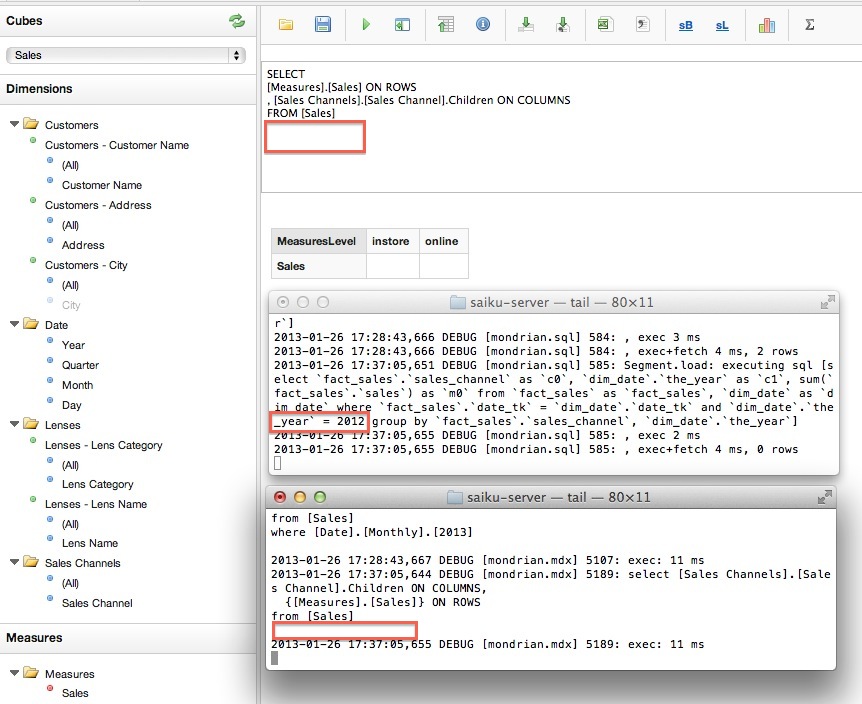

Why is this happening? The reason lies in the fact that one of the hierarchies of the date dimension does not have an All member. So Mondrian tries to find the first member of this hierarchy (as this is the default member), which happens to be [Year]. And as in this case I only had data as of the year 2012 in the date dimension table, it was used in the join.

<Hierarchies>
<Hierarchy name="Time" hasAll="false">
<Level attribute="Year" />
<Level attribute="Quarter" />
<Level attribute="Month" />
<Level attribute="Day"/>
</Hierarchy>
<Hierarchy name="Weekly" hasAll="true">
<Level attribute="Year" />
<Level attribute="Week"/>
<Level attribute="Weekday"/>
</Hierarchy>
</Hierarchies>


Note if we use a hierarchy of the Date dimension in the MDX then everything works as expected:
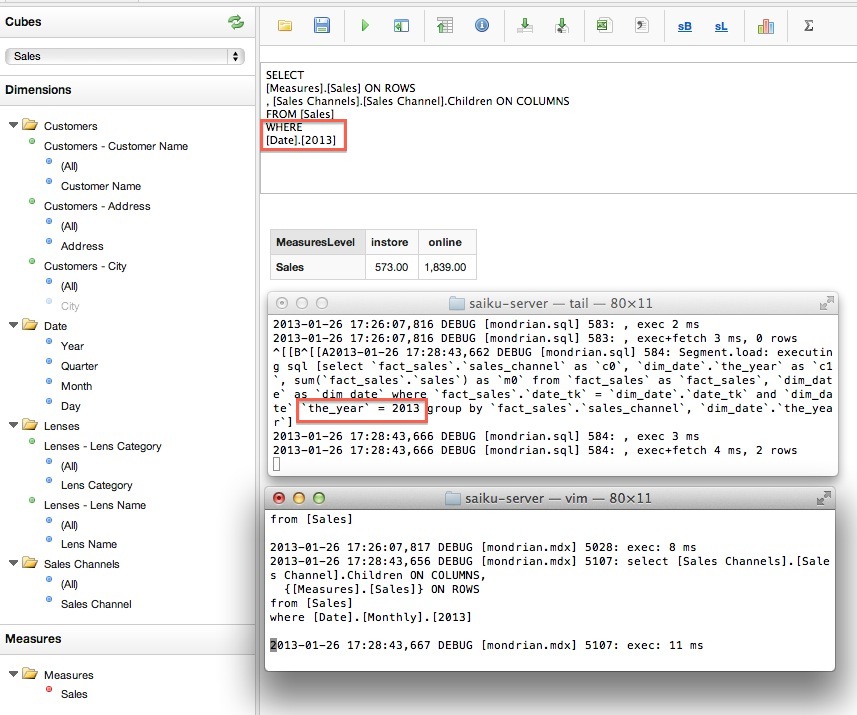

So it is really important to keep in mind what consequences not defining an All member has!

Tuesday, October 30, 2012

Jasper Report: Gracefully Hide Columns On Request

For some reports you might want to offer the end users some more flexibility in terms of which columns they actually want to see in the report.
Documentation about this feature is scarce. When I was looking at a solution for this request some time ago I coincidentally stumble across Nestor's blog post (Some years ago, when I was living in Miami, Nestor and I used to work for the same company), which I found very useful.

Our requirement is that when a column is hidden it must not consume any space, meaning all columns to the right of it move gracefully to the left. This can be achieved using the table component. 
Our initial report looks something like this:


Define a parameter (i.e. SHOW_CONTINENT) and set its type to Boolean. 
Set the default value to:


new Boolean(true) 

and tick Use as a prompt.

Note: This parameter does not have to be passed to the subdata set!

Screenshot: iReport - Parameter Properties
Screenshot: JasperStudio - Parameter Properties
In the table mark the header column element for the column which you want to hide on request. It is best to select this from the Document Inspector - make sure it is the column and not the element within the cell: 
Note: It does not really matter on which level (table header, column header, detail etc) you select the column.

In the Properties set the Column Print When condition to:

new Boolean($P{PARAMETERNAME})

Screenshot: iReport - Column Properties
Screenshot: JasperStudio - Column Properties
Let's now preview the report. When asked if we want the continent column displayed, we say yes:
Now let's preview the report with the continent column disabled:
As you can see from the screenshot the continent column is not shown and the country, city and sales columns all nicely moved to the left.